Predict how your lights will actually render on camera.
Design your rig, dial the look you want at the subject, and Northlight hands you the Kelvin and tint to set — before you roll.
- iPhone
- iPad
- Mac
rendered shift = mireds(light) − mireds(camera WB)Positive is warm, negative is cool. A fixture's nominal Kelvin is a claim; a measurement is the truth. Northlight turns that one relationship into a design surface.
Four moves, from empty stage to camera-ready numbers.
Northlight is a planning instrument, not a control surface: it computes the targets, you dial them into your own fixtures by hand.
Build your rig
Add fixtures from a catalog of ~44 popular models — or define your own: bi-color range or fixed CCT, output, beam angle, modifiers, bounce. Pick your camera body and its white-balance range. Everything lives in a synced library.
Design the look
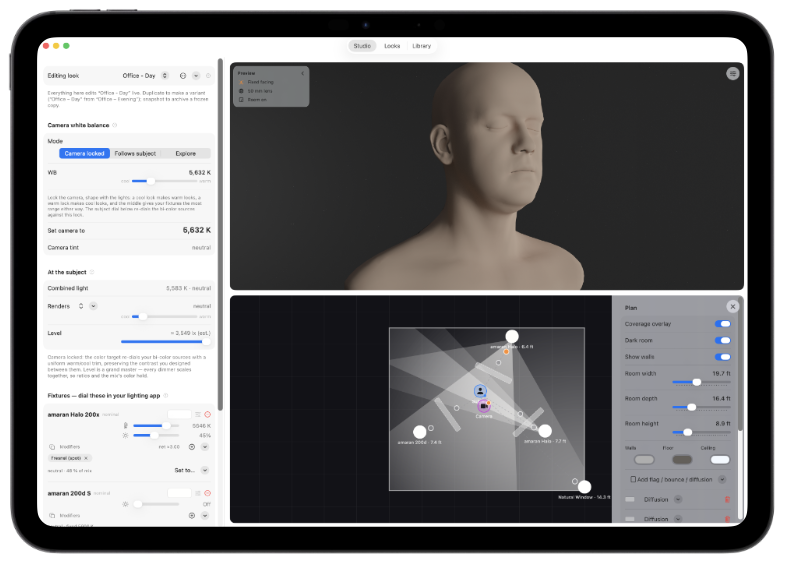
In Studio, place fixtures on a top-down plan around your subject and dial the look you want at the face. Northlight solves the mix live: combined color, key-to-fill contrast, and illuminance — with warm/cool and gel-equivalent read-outs.
See it rendered
On ray-tracing-capable Apple silicon, a path-traced preview shows a head lit by your exact setup — real perspective from your camera, your chosen lens, skin tone or neutral clay, bounce and negative fill, windows and room bounce.
Calibrate with Measure
Point your iPhone at a grey card under a fixture; Northlight reads the real rendered color (median-aggregated, with a stability gate) and records it. Measured values then drive your predictions — closing the gap between spec and reality.
Real color science, made into a tool you can light with.
White-balance predictionMired space, XYZ mixing, Planckian locus, Duv tint — the real math.
Back-solves your targetsFixture Kelvin/tint and camera WB to hit the look you designed.
Subject-anchored designDial the look at the face; the app re-solves the camera or re-dials bi-color sources, contrast preserved.
Three WB modesCamera-locked, Follows-subject, and Explore.
Top-down planDraggable fixtures, camera, subject, and walls, with beam-coverage overlays from real photometrics.
Path-traced previewHardware ray tracing with lens, skin tone, grips, windows, and room bounce.
Measure tabGrey-card calibration with your phone; measurements are the source of truth.
Libraries & catalogCurated fixtures and cameras, modifiers, and bounce surfaces.
Photometric read-outsContrast ratio and illuminance in lux or foot-candles.
iCloud syncYour library and looks across iPhone, iPad, and Mac, automatically.
Private by designNo account, no sign-in, no data collection. Your data is yours.
Advisory, not automatedIt computes the numbers; you stay in command of the fixtures.
Plan the light. Then roll knowing.
Design your rig, predict how it renders, preview it path-traced, and calibrate it with your phone.
Download on the App Store